Argo CD Application Set for Multi-Cluster GitOps - Complete Guide
Creating one Argo CD Application is straightforward. You tell Argo CD where the Kubernetes manifests are stored, choose a destination cluster and namespace, and let the controller synchronize the application.
The difficulty appears when the platform grows.
Imagine that the same application must run in development, staging, and production. You might begin by copying the original Application manifest three times. Later, another cluster is added. Then a second application team arrives. Before long, the repository contains dozens of nearly identical files, and every small change must be repeated carefully across all of them.
Argo CD ApplicationSet solves this repetition problem. Instead of manually writing every Application, you define a generator and a reusable template. The generator discovers information such as registered clusters, Git directories, or environment configuration files. ApplicationSet then places those values into the template and creates the required Argo CD Applications automatically.
In this guide, we will build the entire setup from the beginning. We will create one Argo CD management cluster and two workload clusters on a local computer, register both clusters, deploy a small application with several ApplicationSet generators, combine Git and cluster data with the Matrix generator, and finish with a controlled development-to-production rollout.
The lab is intentionally local and cloud-free, so you can learn the workflow without paying for EKS, GKE, or AKS. The same ApplicationSet concepts apply when the destination clusters are real managed Kubernetes clusters.
This guide uses Argo CD
v3.5.3, which was the latest stable release when the article was written. Pin and test the version approved by your organization instead of automatically installing a moving branch in production.
What Is Argo CD ApplicationSet?
An ApplicationSet is a Kubernetes custom resource managed by the ApplicationSet controller. Its job is to create and maintain Argo CD Application resources from a reusable template.
That distinction is important:
- The ApplicationSet controller generates Argo CD Applications.
- The Argo CD application controller reads those Applications and synchronizes Kubernetes resources.
- Kubernetes runs the resulting Deployments, Services, and other workloads.
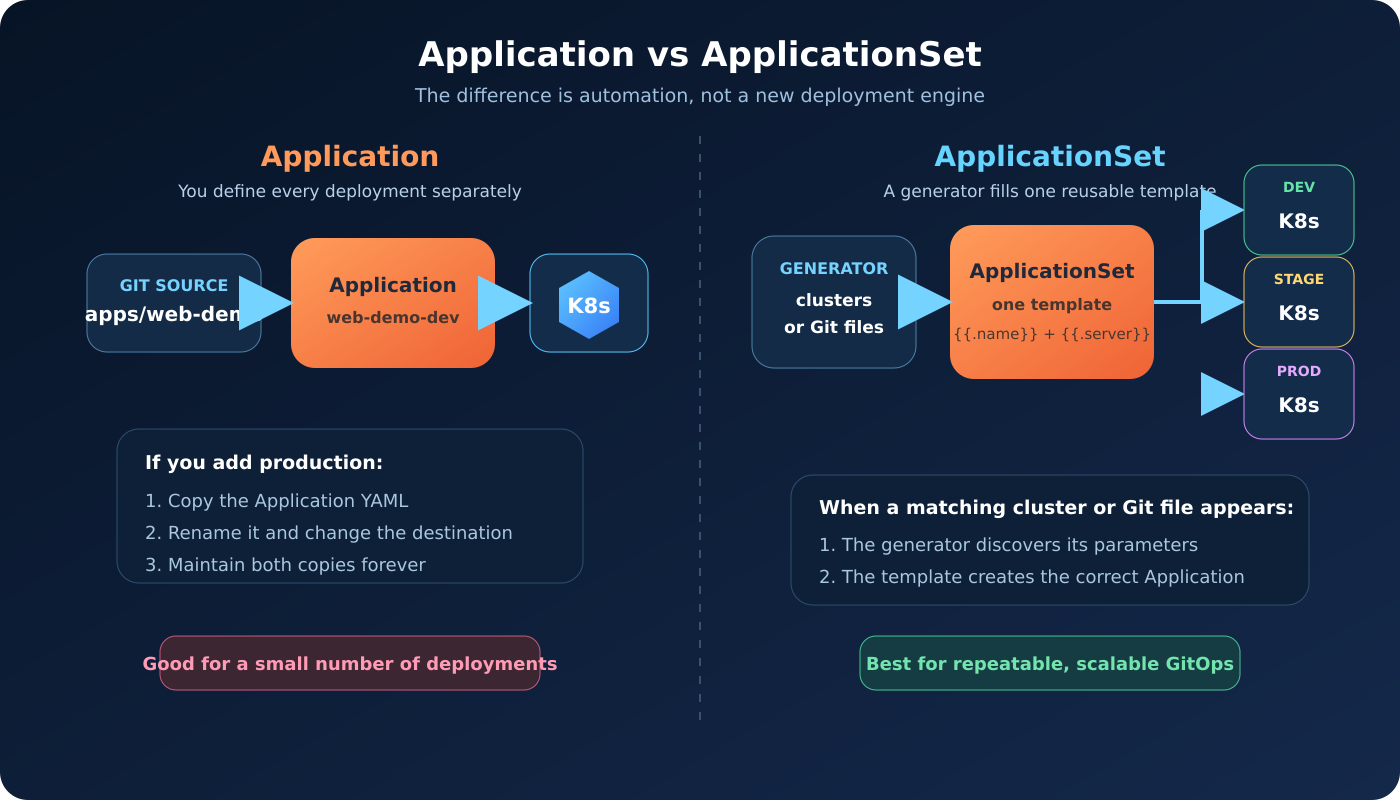
ApplicationSet does not replace Argo CD Applications. It automates their creation.
Think of a normal Application as one completed form. An ApplicationSet is the form template plus a list of values. For every set of values, the controller produces one completed form.
Application vs ApplicationSet
With a normal Application, one manifest normally represents one source-and-destination combination. If an application runs in three environments, you often maintain three Application manifests.
With an ApplicationSet, a generator can produce three parameter sets and insert each set into the same template. The result is still three Applications, but you maintain the generation rule instead of three repeated files.
| Capability | Application | ApplicationSet |
|---|---|---|
| Main purpose | Deploy one declared application | Generate and manage multiple Applications |
| Repetition | One manifest per deployment | One template can create many deployments |
| Cluster discovery | Destination is written directly | Cluster generator can discover registered clusters |
| Git discovery | Path is written directly | Git generator can discover directories or files |
| Multi-cluster scaling | Requires additional Application resources | New matching clusters can generate Applications automatically |
| Best fit | Small and unique deployments | Repeated environments, clusters, tenants, or applications |
ApplicationSet is not automatically better for every workload. A single unique application with one destination may be clearer as a normal Application. ApplicationSet becomes valuable when a repeatable pattern exists.
The ApplicationSet Mental Model
Every ApplicationSet is easier to understand when you separate it into three parts:
- Generator – produces one or more sets of parameters.
- Template – describes the Argo CD Application to create.
- Generated Applications – the final Application resources managed by the controller.
Here is a tiny example:
1 | apiVersion: argoproj.io/v1alpha1 |
The List generator produces these two parameter sets:
1 | environment=development |
The template is rendered once for each set. The controller therefore creates:
1 | hello-development |
The expressions inside {{` and `}} are Go template expressions. We enable missingkey=error so that a misspelled or missing parameter causes a visible error instead of quietly producing an incomplete Application.
Common ApplicationSet Generators
ApplicationSet supports several generators. You do not need to memorize all of them before starting.
| Generator | Where parameters come from | Typical use case |
|---|---|---|
| List | Values written directly in the ApplicationSet | A small, fixed list of environments or clusters |
| Cluster | Clusters registered with Argo CD | Deploy an application to every cluster matching specific labels |
| Git directory | Directory names in a Git repository | Discover applications or environment folders |
| Git file | Values inside YAML or JSON files | Store environment configuration as data in Git |
| Matrix | Combines two child generators | Match Git configuration with registered clusters |
| Merge | Merges generator output using matching keys | Apply defaults and environment overrides |
| SCM Provider | Repositories discovered from GitHub, GitLab, or another provider | Generate Applications across many repositories |
| Pull Request | Open pull requests | Create temporary preview environments |
We will use the first four concepts in this tutorial and finish with Matrix because it gives us a practical Git-driven, multi-cluster design.
Architecture Used in This Guide
We will create three single-node kind clusters:
argocd-hubruns Argo CD and the ApplicationSet controller.developmentruns the development copy of our application.productionruns the production copy of our application.
The Git repository stores the application manifests and environment configuration. Argo CD reads Git from the management cluster and deploys the correct overlay to each workload cluster.
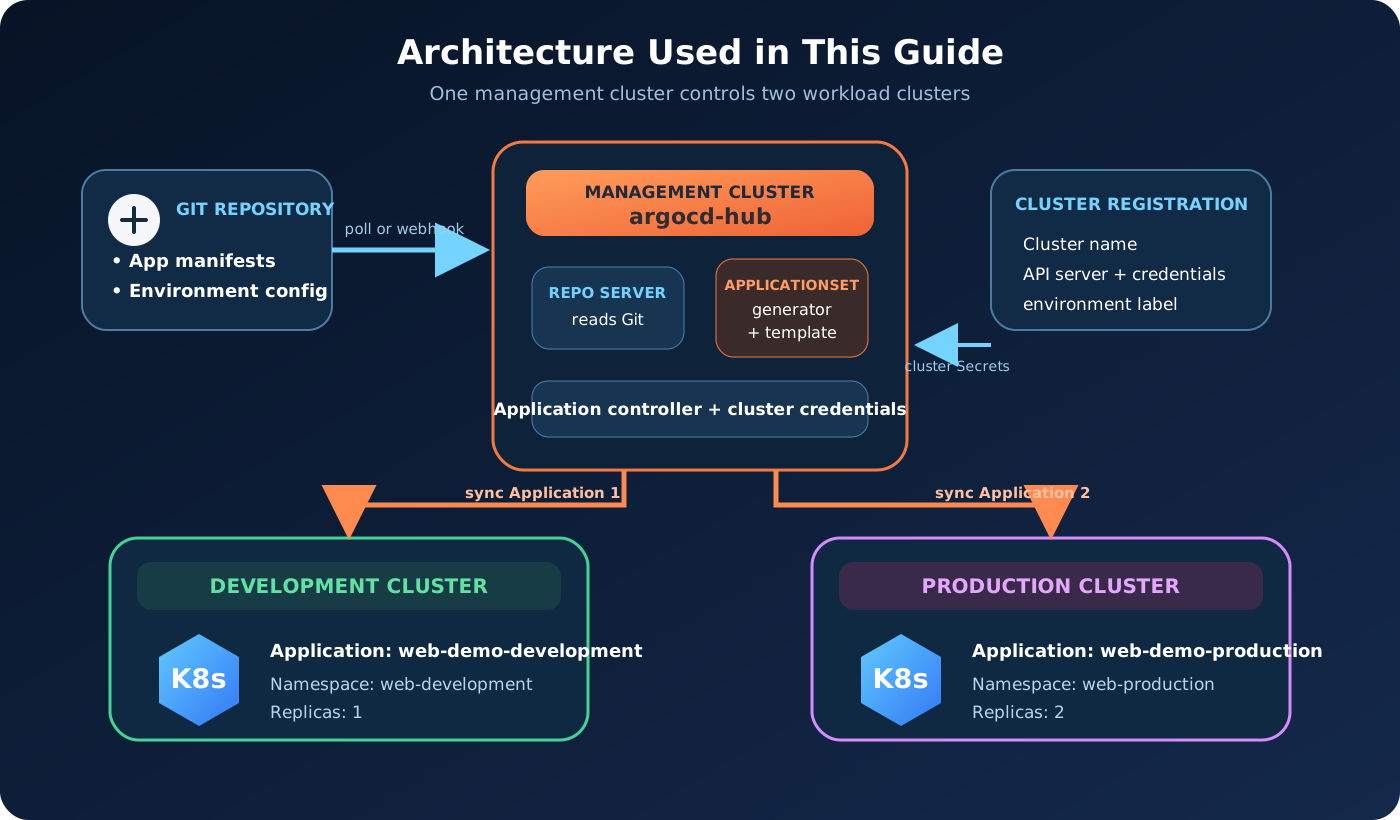
The management cluster is the control plane for GitOps, but it is not the Kubernetes control plane of the other clusters. Each workload cluster remains independent. Argo CD connects to their Kubernetes API servers with credentials stored as Secrets in the argocd namespace.
In a production environment, the hub could be an EKS cluster and the workload destinations could be separate EKS, GKE, AKS, OpenShift, or on-premises clusters.
Repository Structure
We will build the following repository:
1 | argocd-applicationset-lab/ |
The base contains resources shared by every environment. Each overlay changes only what is different. The environment files contain the data used by the Git and Matrix generators.
Prerequisites
Before starting, make sure you have:
- Docker Engine or Docker Desktop running
kindinstalledkubectlinstalled- Argo CD CLI installed
- Git installed
- A Git hosting account such as GitHub or GitLab
- Approximately 6–8 GB of free memory for the three local clusters
The commands are written for Bash and work well in Linux, macOS, WSL, and Git Bash. PowerShell users can run the Kubernetes commands, but should translate the shell variable and multiline examples where necessary.
Verify the tools:
1 | docker version |
Do not continue if Docker is not running or any command is missing.
Create the Three Kubernetes Clusters
The hub cluster does not require special configuration:
1 | kind create cluster --name argocd-hub |
For the two workload clusters, we add their internal Docker hostnames to the Kubernetes API certificate. This allows Argo CD, which runs inside another kind cluster, to connect securely through the shared Docker network.
Create kind/development.yaml:
1 | kind: Cluster |
Create kind/production.yaml:
1 | kind: Cluster |
Create the workload clusters:
1 | kind create cluster \ |
List the clusters and kubeconfig contexts:
1 | kind get clusters |
You should see:
1 | argocd-hub |
The corresponding context names are normally:
1 | kind-argocd-hub |
Verify every cluster separately:
1 | kubectl --context kind-argocd-hub get nodes |
Each command should show one control-plane node in the Ready state.
Install Argo CD in the Hub Cluster
Set the Argo CD version used by this guide:
1 | export ARGOCD_VERSION="v3.5.3" |
Create the namespace and install the pinned manifest:
1 | kubectl --context kind-argocd-hub \ |
The --server-side option is important because some Argo CD CRDs are too large for the annotation created by client-side apply. --force-conflicts is acceptable for this fresh lab installation. Do not use it casually against an existing installation managed by Helm or another owner.
Wait for the main components:
1 | kubectl --context kind-argocd-hub \ |
Confirm that the Pods are running:
1 | kubectl --context kind-argocd-hub \ |
The standard Argo CD installation already contains the ApplicationSet controller. Do not install the old standalone ApplicationSet project on top of a current Argo CD installation.
Access Argo CD
Set the hub as the current context so the Argo CD administrative commands use the correct cluster:
1 | kubectl config use-context kind-argocd-hub |
Start a local port forward in one terminal and leave it running:
1 | kubectl --namespace argocd \ |
In a second terminal, display the initial admin password:
1 | argocd admin initial-password --namespace argocd |
Log in. The command will ask for the password, which avoids storing it in shell history:
1 | argocd login localhost:8080 \ |
We use --insecure only because the local port forward reaches Argo CD’s default self-signed certificate. Production access should use a trusted TLS certificate without this flag.
Verify the client and server versions:
1 | argocd version |
Register the Workload Clusters
Argo CD must know how to authenticate to each destination cluster. Register the development cluster and attach an environment label:
1 | argocd cluster add kind-development \ |
Register production:
1 | argocd cluster add kind-production \ |
The command creates an argocd-manager ServiceAccount and RBAC resources in each workload cluster. It then stores the connection information as a Secret in the hub’s argocd namespace.
Fix the Local Kind API Endpoints
There is one local-lab detail to fix. The kubeconfig created by kind normally points to a host address such as https://127.0.0.1:54321. That address works from your laptop, but 127.0.0.1 inside the Argo CD Pod refers to the Pod itself.
We will replace the stored endpoints with the workload control-plane container names, which are reachable across kind‘s Docker network.
Find the development cluster Secret:
1 | DEV_SECRET=$(kubectl --context kind-argocd-hub \ |
Patch its server address:
1 | kubectl --context kind-argocd-hub \ |
Repeat the process for production:
1 | PROD_SECRET=$(kubectl --context kind-argocd-hub \ |
Wait a few seconds and inspect the registered clusters:
1 | argocd cluster list |
Both development and production should eventually report a successful connection.
The endpoint patch is specific to this multi-
kindlab. Do not replace managed-cluster endpoints with Docker hostnames in EKS, GKE, AKS, or OpenShift.
A Production Security Warning
The default argocd cluster add flow creates powerful cluster-wide permissions. That is convenient for a lab but should not become an unreviewed production default. Limit Argo CD to approved namespaces where possible, create purpose-built RBAC, rotate credentials, and protect the cluster Secrets in the argocd namespace.
Create the Destination Namespaces
Our AppProject will not allow applications to create cluster-scoped Namespace resources. The platform administrator creates the namespaces first:
1 | kubectl --context kind-development \ |
Verify them:
1 | kubectl --context kind-development \ |
This separation reflects a common production model: the platform team provisions namespaces with quotas, network policies, Pod Security labels, and ownership metadata before application teams deploy workloads.
Create the Git Repository and Example Application
The repository URL used in this guide is a template. A repository named argocd-applicationset-lab will not exist in your account until you create it.
Create an Empty GitHub Repository
- Sign in to GitHub.
- Select New repository from the + menu.
- Enter
argocd-applicationset-labas the repository name. - Select Public. This lets the lab Argo CD installation read the repository without extra credentials.
- Leave Add a README file,
.gitignore, and licence unchecked. We want an empty repository. - Select Create repository.
GitHub will now show the real URL of your new repository. Replace YOUR_GITHUB_USERNAME with your GitHub username. For example, if the username is dinushchathurya, the URL becomes:
1 | https://github.com/dinushchathurya/argocd-applicationset-lab.git |
Clone your newly created repository and enter its directory:
1 | git clone https://github.com/YOUR_GITHUB_USERNAME/argocd-applicationset-lab.git |
You may see this message:
1 | warning: You appear to have cloned an empty repository. |
That warning is expected. The repository is empty because we have not created or pushed the lab files yet.
If Git reports
Repository not found, confirm that you created the repository first, used the correct username, and copied the exact clone URL from GitHub.
Replace every remaining YOUR_GITHUB_USERNAME value in this guide with your real account or organization.
Create these directories:
1 | mkdir -p apps/web-demo/base |
Create the Shared Deployment
Create apps/web-demo/base/deployment.yaml:
1 | apiVersion: apps/v1 |
The small http-echo container returns a text response. This makes it easy to prove which environment is serving traffic.
Create apps/web-demo/base/service.yaml:
1 | apiVersion: v1 |
Create apps/web-demo/base/kustomization.yaml:
1 | apiVersion: kustomize.config.k8s.io/v1beta1 |
Create the Development Overlay
Create apps/web-demo/overlays/development/kustomization.yaml:
1 | apiVersion: kustomize.config.k8s.io/v1beta1 |
Development runs one replica and returns a development-specific message.
Create the Production Overlay
Create apps/web-demo/overlays/production/kustomization.yaml:
1 | apiVersion: kustomize.config.k8s.io/v1beta1 |
Production runs two replicas and returns a different message.
Render both overlays locally before committing them:
1 | kubectl kustomize apps/web-demo/overlays/development |
This catches YAML, path, and patch errors before Argo CD encounters them.
Add Environment Configuration Files
The Git file generator can read YAML or JSON and expose its fields as template parameters.
Create environments/development/config.yaml:
1 | environment: development |
Create environments/production/config.yaml:
1 | environment: production |
These files contain data, not Kubernetes objects. ApplicationSet will parse them and make .environment, .clusterName, and .namespace available to the template.
Commit and push the initial repository:
1 | git add . |
Open the repository in your browser and confirm that the apps, environments, applicationsets, projects, and kind directories are visible before continuing.
Create a Restricted AppProject
An ApplicationSet can generate Applications, but every generated Application must still obey its AppProject. We will restrict the source repository, cluster names, namespaces, and resource types.
Create projects/platform-project.yaml:
1 | apiVersion: argoproj.io/v1alpha1 |
Replace the repository URL, commit the change, and apply the project to the hub:
1 | kubectl --context kind-argocd-hub \ |
Inspect it:
1 | argocd proj get applicationset-lab |
The project permits only our repository, two cluster-and-namespace combinations, Service, and Deployment. It does not grant permission to deploy cluster-scoped resources.
If you want a deeper explanation of project boundaries and user permissions, read Argo CD Multi-Tenancy with AppProjects, RBAC, and SSO.
Start with the List Generator
The List generator is the easiest generator to understand because every parameter is written directly in the manifest.
Create applicationsets/01-list-generator.yaml:
1 | apiVersion: argoproj.io/v1alpha1 |
Replace the repository URL and apply the file:
1 | kubectl --context kind-argocd-hub \ |
Inspect the parent ApplicationSet:
1 | kubectl --context kind-argocd-hub \ |
List the generated Applications:
1 | kubectl --context kind-argocd-hub \ |
If your Argo CD version does not add that instance label, list by name instead:
1 | argocd app list | grep list-web-demo |
You should see:
1 | list-web-demo-development |
Verify the workloads directly:
1 | kubectl --context kind-development \ |
Development should have one Pod and production should have two.
Test the Responses
Start a temporary port forward to development:
1 | kubectl --context kind-development \ |
In another terminal:
1 | curl http://localhost:8081 |
Expected response:
1 | Hello from the DEVELOPMENT cluster |
Stop the first port forward and test production:
1 | kubectl --context kind-production \ |
1 | curl http://localhost:8082 |
Expected response:
1 | Hello from the PRODUCTION cluster |
The List generator works, but cluster addresses are still written manually. The Cluster generator removes that requirement.
Discover Clusters with the Cluster Generator
Delete the first example before applying the next one. This avoids multiple Applications trying to own the same resources:
1 | kubectl --context kind-argocd-hub \ |
Wait until its generated Applications disappear:
1 | kubectl --context kind-argocd-hub \ |
Create applicationsets/02-cluster-generator.yaml:
1 | apiVersion: argoproj.io/v1alpha1 |
The Cluster generator reads Argo CD’s registered cluster Secrets. For every Secret whose environment label is development or production, it exposes parameters such as:
.name.nameNormalized.server.metadata.labels.metadata.annotations
nameNormalized is useful for Kubernetes resource names because unsupported characters are converted into hyphens.
Apply and verify:
1 | kubectl --context kind-argocd-hub \ |
You should receive one Application for each matching registered cluster.
This creates a powerful onboarding pattern: when the platform team registers a new cluster with the correct labels, the Cluster generator can automatically create its standard applications.
Read Environment Data with the Git Generator
The Cluster generator treats cluster registration as the source of truth. Sometimes you want Git to declare which environments should exist and how each one should be configured.
Delete the Cluster generator example:
1 | kubectl --context kind-argocd-hub \ |
Create applicationsets/03-git-generator.yaml:
1 | apiVersion: argoproj.io/v1alpha1 |
This generator finds both config.yaml files and parses their fields. Notice that the destination uses the registered cluster name rather than its server address.
Apply and verify:
1 | kubectl --context kind-argocd-hub \ |
If a third environment file is added with a valid cluster name, this generator can create a third Application without changing the ApplicationSet manifest.
By default, the Git generator polls the repository periodically. A production installation can configure a webhook to reduce the delay between a Git push and ApplicationSet reconciliation.
Combine Git and Cluster Data with the Matrix Generator
The Git generator trusts the cluster name written in Git. The Cluster generator trusts the labels attached during cluster registration. A Matrix generator can combine both sources and require them to match.
Delete the Git-only example:
1 | kubectl --context kind-argocd-hub \ |
Here is the flow we want:
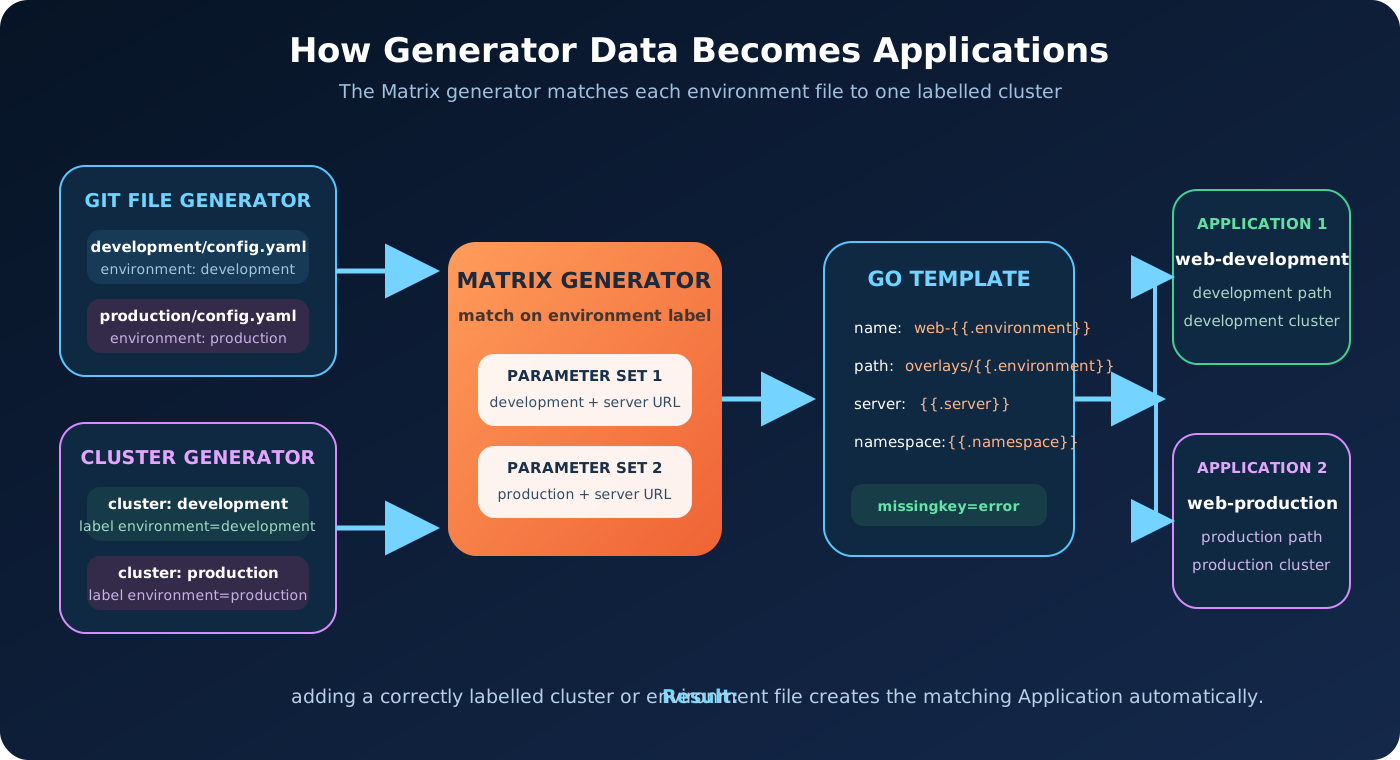
The Git generator runs first and produces an environment value. The Cluster generator runs second and uses that value in its label selector. Development configuration therefore matches only the development cluster, and production configuration matches only production.
Create applicationsets/04-matrix-generator.yaml:
1 | apiVersion: argoproj.io/v1alpha1 |
Apply it:
1 | kubectl --context kind-argocd-hub \ |
Inspect the parent and its generated Applications:
1 | kubectl --context kind-argocd-hub \ |
Inspect one rendered Application:
1 | kubectl --context kind-argocd-hub \ |
You should see the development overlay, internal development server address, and web-development namespace in the rendered specification.
Why Generator Order Matters
In this Matrix, the Git generator must come first because it produces .environment. The Cluster generator consumes that value in this selector:
1 | environment: '{{.environment}}' |
Reversing the child generators creates an invalid dependency because .environment would not exist when the cluster selector is evaluated.
The Matrix generator supports two child generators. It combines or passes their parameters into one final template. When two Git generators are combined, use pathParamPrefix to prevent their automatically generated path parameters from colliding.
Test a Real GitOps Change
Now prove that Git, ApplicationSet, Argo CD, and both clusters form one complete workflow.
Edit the production overlay and change the replica count from two to three:
1 | replicas: |
Commit and push the change:
1 | git add apps/web-demo/overlays/production/kustomization.yaml |
Ask Argo CD to refresh immediately instead of waiting for its normal reconciliation interval:
1 | argocd app get matrix-web-demo-production --refresh |
Watch the production Deployment:
1 | kubectl --context kind-production \ |
Production should reach three running Pods. Development remains at one because its overlay did not change.
This is the key GitOps result: the environment-specific desired state changed in Git, Argo CD detected the difference, and only the intended cluster was updated.
Add Progressive Syncs
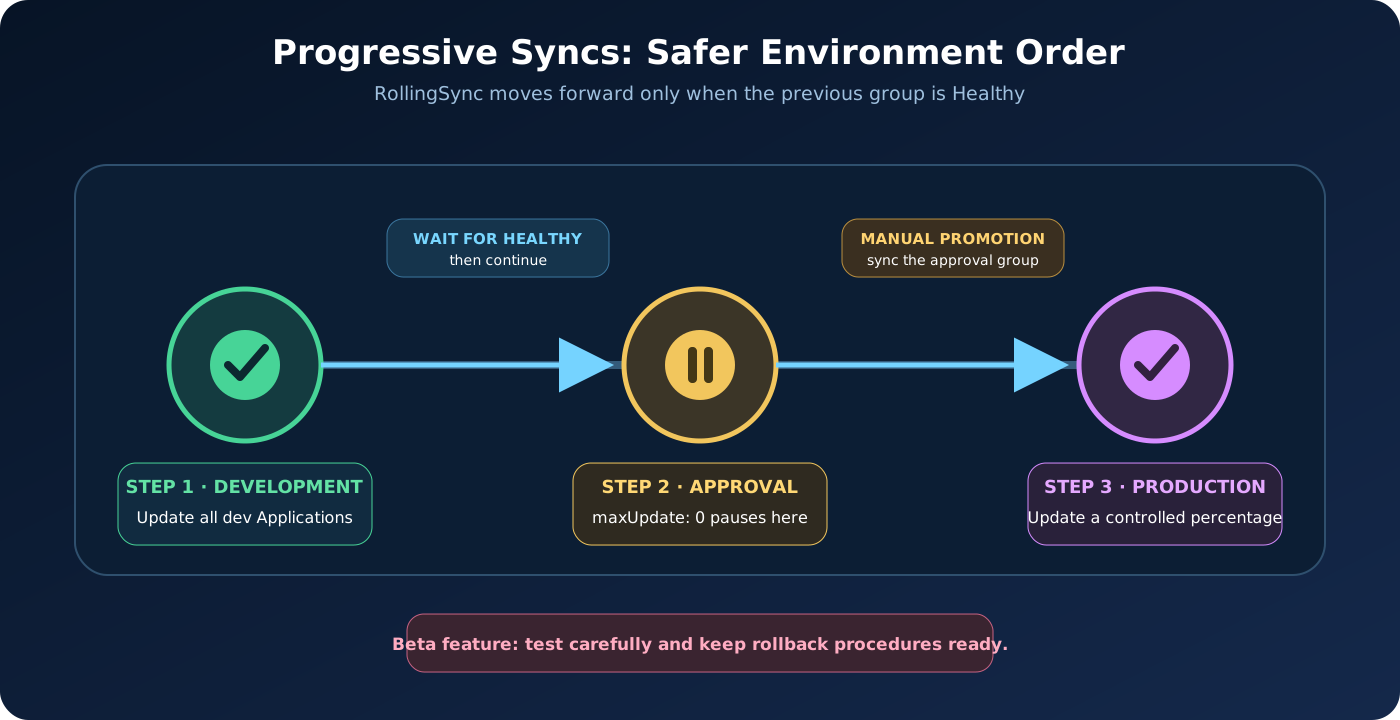
Standard automated synchronization can update all generated Applications as soon as their desired state changes. Some platforms need a controlled order—for example, update development first, wait until it is healthy, and then allow production.
ApplicationSet Progressive Syncs provide a RollingSync strategy for this purpose.
Progressive Syncs are a Beta feature in Argo CD 3.5. Test the exact version and behavior in a non-production environment before relying on it for critical releases.
Enable the Feature
Enable Progressive Syncs in the Argo CD command parameters ConfigMap:
1 | kubectl --context kind-argocd-hub \ |
Restart the ApplicationSet controller so it reads the setting:
1 | kubectl --context kind-argocd-hub \ |
Delete the standard Matrix example:
1 | kubectl --context kind-argocd-hub \ |
Lab note: This delete-and-recreate step is safe for the disposable Kind lab in this guide. Do not use the same approach for a live production ApplicationSet without first reviewing its deletion policy and testing how the generated Applications and workloads will be handled.
Create applicationsets/05-progressive-syncs.yaml:
1 | apiVersion: argoproj.io/v1alpha1 |
Notice that the generated Application template does not contain automated sync. RollingSync deliberately controls the sync operations itself.
Apply it:
1 | kubectl --context kind-argocd-hub \ |
Watch both Applications:
1 | argocd app list | grep progressive-web-demo |
The strategy means:
- All Applications labelled
environment=developmentmay update. - The controller waits until the development group becomes healthy.
- Production has
maxUpdate: 0, so it requires manual synchronization.
Approve production after verifying development:
1 | argocd app sync progressive-web-demo-production |
Then wait for it to become healthy:
1 | argocd app wait progressive-web-demo-production \ |
Progressive Syncs coordinate the order of Argo CD Applications. They are not a replacement for fine-grained traffic shifting, metric analysis, or automated rollback inside one workload. For those capabilities, use Argo Rollouts Canary Deployment - The Complete Production Guide.
What Happens During Reconciliation?
The complete control loop now looks like this:
- The ApplicationSet controller reads the environment files from Git.
- It finds registered cluster Secrets whose labels match each environment.
- The Matrix generator combines the Git and cluster parameters.
- The Go template renders one Argo CD Application per match.
- The ApplicationSet controller creates or updates those Application resources.
- The Argo CD application controller compares Git with each destination cluster.
- The application controller synchronizes the Kustomize resources.
- Kubernetes creates or updates the Deployment and Service.
- Argo CD continuously detects drift between Git and the live clusters.
If an environment file is removed, a cluster label changes, or a cluster is removed, the generated set can also shrink. This is why deletion behavior must be reviewed carefully before a production rollout.
Troubleshooting
No Applications Are Generated
Run npm install, then restart the dev server.
Inspect the ApplicationSet:
1 | kubectl --context kind-argocd-hub \ |
Read the controller logs:
1 | kubectl --context kind-argocd-hub \ |
Check:
- The Git repository URL is correct.
- The revision exists.
environments/*/config.yamlmatches real files.- The registered cluster Secret has the required
environmentlabel. - The Git environment value exactly matches the label value.
- The parameter-producing generator appears before the consuming generator.
map has no entry for key
This is missingkey=error doing its job. A template references a parameter that the generator did not produce.
Compare the spelling and capitalization in the configuration file and template. For example, .clusterName and .clustername are different.
Cluster Connection Shows Unknown or Failed
Run:
1 | argocd cluster list |
For this local lab, confirm that the stored servers are:
1 | https://development-control-plane:6443 |
If they still use 127.0.0.1, repeat the Secret patches.
x509: certificate is valid for ..
The Kubernetes API certificate does not contain the internal control-plane hostname. Recreate the affected kind cluster with the matching certSANs configuration from Step 1, then register it again.
Do not solve a production certificate problem by permanently disabling TLS verification.
AppProject Rejects the Application
Inspect the Application conditions:
1 | argocd app get matrix-web-demo-development |
Common messages include:
- Repository is not permitted
- Destination cluster is not permitted
- Destination namespace is not permitted
- Resource kind is not permitted
Compare the rendered Application with projects/platform-project.yaml.
Kustomize Path Does Not Exist
Render the exact path locally:
1 | kubectl kustomize apps/web-demo/overlays/development |
Also confirm that the file was committed and pushed. A correct local file that is absent from the remote repository is still invisible to Argo CD.
Two Applications Fight Over the Same Resources
This usually happens when two tutorial ApplicationSets are active simultaneously. List them:
1 | kubectl --context kind-argocd-hub \ |
Keep only the example you are currently testing.
Progressive Syncs Do Not Start
Confirm the feature flag:
1 | kubectl --context kind-argocd-hub \ |
It should print true.
Check the controller logs and verify that generated Applications contain the labels referenced by each matchExpressions step.
If a previous group is not Healthy, RollingSync will not move forward. Inspect that Application rather than repeatedly restarting the controller.
Production Remains OutOfSync
In our Progressive Sync example, this is expected because production uses:
1 | maxUpdate: 0 |
Approve it manually:
1 | argocd app sync progressive-web-demo-production |
Cleanup
Delete the active ApplicationSet first:
1 | kubectl --context kind-argocd-hub \ |
If you stopped before the Progressive Sync section, remove any other tutorial ApplicationSets:
1 | kubectl --context kind-argocd-hub \ |
Remove the project:
1 | kubectl --context kind-argocd-hub \ |
Remove both registered clusters while Argo CD is still available:
1 | argocd cluster rm development |
Delete the three local Kubernetes clusters:
1 | kind delete cluster --name development |
Stop any remaining port-forward command with Ctrl+C.
Deleting the local Git repository is optional. Keep it if you want to extend the lab with staging, additional applications, or a cloud cluster.
Final Thoughts
Argo CD ApplicationSet becomes valuable when GitOps moves beyond a handful of manually maintained Applications. It gives platform teams a repeatable way to transform cluster registrations, repository structure, and environment configuration into consistent Argo CD Applications.
You now have a working multi-cluster GitOps lab in which one ApplicationSet can discover configuration, match the correct clusters, create Applications, and coordinate their deployment order—all while the application manifests remain clean and reusable in Git.